Run REST API Request with Template Parameter
How to Run a REST API Request with Template Parameters?
✍: FYIcenter.com
 When running a REST API request, you need to provide a
actual values to each template parameter as shown in
this tutorial.
When running a REST API request, you need to provide a
actual values to each template parameter as shown in
this tutorial.
1. Start SoapUI on your computer.
2. Click "File > Import" menu to open your SoapUI test project stored in "\fyicenter\REST-Project.xml".
3. Double-click on "Request 1" under "REST Project 1 > https://api.iextrading.com > Quote [...] > Method 1". You see the "Request 1" window.
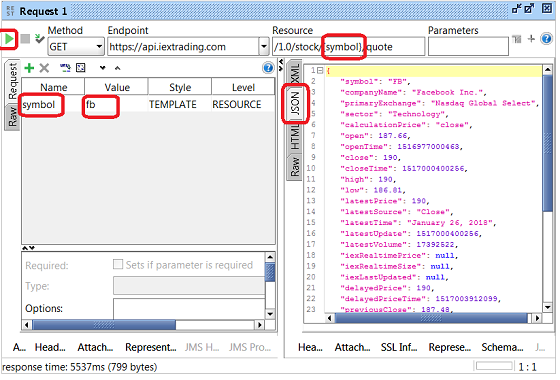
4. Click in the "Value" field of the "symbol" parameter and enter "fb" as the new value.
5. Click the "Run" icon. You see the request executed.
6. Click the "JSON" tab on the response panel on the right. You see the response displayed as the JSON data format.
7. Click "File > Save All Projects" menu and save it as "\fyicenter\REST-project.xml".
The picture below shows you how to run your SoapUI REST project with template parameter:
⇒ Run REST API Request with Query Parameter
⇐ REST API Resource with Template Parameters
2018-03-13, ∼3750🔥, 0💬
Related Topics:
