Run REST Project Request in SoapUI
How to run a REST project request in SoapUI?
✍: FYIcenter.com
 A request in a REST project represents a HTTP request
of a specific GET or other method for a specific resource
provided a REST API.
A request in a REST project represents a HTTP request
of a specific GET or other method for a specific resource
provided a REST API.
This tutorial shows you how to run a request in a REST project in SoapUI using iextrading.com API as an example.
1. Start SoapUI on your computer.
2. Click "File > Import" menu to open your SoapUI test project stored in "\fyicenter\REST-Project.xml". You see the REST project displayed in the project explorer panel on the left.
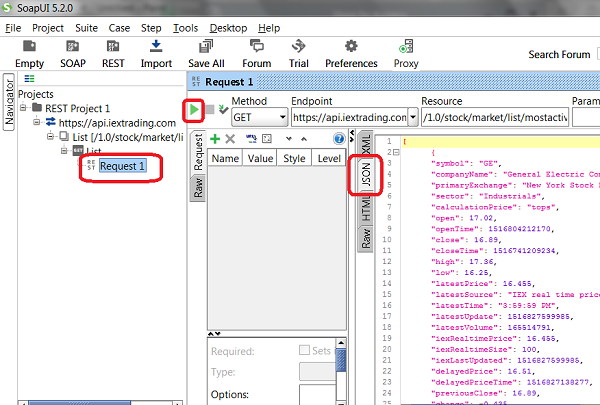
3. Double-click on "Request 1" under "REST Project 1 > https://api.iextrading.com > List [...] > [GET] List". You see the "Request 1" window.
4. Click the "Run" icon. You see the request executed.
5. Click the "JSON" tab on the response panel on the right. You see the response displayed as the JSON data format.
6. Click "File > Save All Projects" menu and save it as "\fyicenter\REST-project.xml".
The picture below shows you how to run your SoapUI REST project:
⇒ Rename Project Objects in SoapUI
⇐ Create REST Project in SoapUI
2018-03-24, ∼3078🔥, 0💬
Related Topics:
