Rename Project Objects in SoapUI
How to rename project objects in SoapUI?
✍: FYIcenter.com
 When you create new SoapUI objects,
their names might be set to default names like:
Project 1, TestSuite 1, Request 1, etc.
When you create new SoapUI objects,
their names might be set to default names like:
Project 1, TestSuite 1, Request 1, etc.
If you don't like those names, you can change them as shown in this tutorial.
1. Start SoapUI on your computer.
2. Click "File > Import" menu to open your SoapUI test project stored in "\fyicenter\REST-Project.xml". You see the REST project displayed in the project explorer panel on the left.
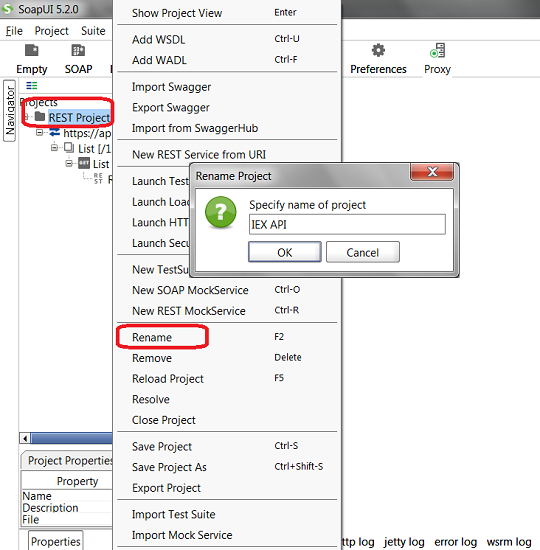
3. Right-mouse click on "REST Project 1" and select "Rename" from the context menu.
4. Enter a new name like "IEX API" in the "Rename Project" dialog box.
5. Click "OK" to confirm the change.
The picture below shows you how to run your SoapUI project objects:
⇒ Add New Resource to REST API Service in SoapUI
⇐ Run REST Project Request in SoapUI
2018-03-24, ∼3365🔥, 0💬
Related Topics:
