Turn Off HTTP Response Compression in SoapUI
How to turn off HTTP response compression in SoapUI?
✍: FYIcenter.com
 HTTP response compression reduces the data size and improves Website performance.
But it makes the test job difficult.
You can follow this tutorial to turn off HTTP response compression.
HTTP response compression reduces the data size and improves Website performance.
But it makes the test job difficult.
You can follow this tutorial to turn off HTTP response compression.
1. Click "File > Preferences". You see "Set global SoapUI settings" window.
2. Click on "HTTP Settings" and make this change:
[ ] Accept compressed responses from hosts
3. Click "OK" to save changes.
4. Run the following HTTP request again:
TestStep Name: Bing Home
Endpoint: http://www.bing.com
5. Click the "Raw" tab on the Response panel. You see the response is no longer compressed:
HTTP/1.1 200 OK Cache-Control: private, max-age=0 Content-Length: 122227 Content-Type: text/html; charset=utf-8 Vary: Accept-Encoding P3P: CP="NON UNI COM NAV STA LOC CURa DEVa PSAa PSDa OUR IND" Set-Cookie: _SS=SID=2BCB20860FA76EF015E12B0F0E206FC5; domain=.bing.com; path=/ ... <!DOCTYPE html PUBLIC "-//W3C//DTD XHTML 1.0 Transitional//EN" "http://www.w3.org/TR/xhtml1/DTD/xhtml1-transitional.dtd"> <html lang="en" xml:lang="en" xmlns="http://www.w3.org/1999/xhtml"> <script type="text/javascript"> //<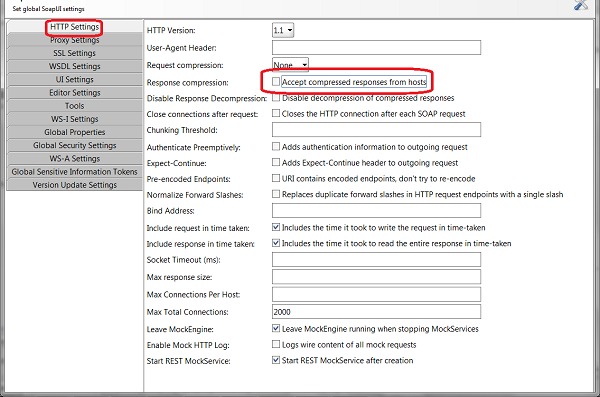
⇒ View Request Execution Log in SoapUI
⇐ gzip Compressed HTTP Response in SoapUI
2018-04-21, ≈12🔥, 0💬
Related Topics:
