View HTTP Log in SoapUI
How to view HTTP request and response logs in SoapUI?
✍: FYIcenter.com
 When you run a test, SoapUI records some debug message
for each HTTP request and response in the HTTP log.
When you run a test, SoapUI records some debug message
for each HTTP request and response in the HTTP log.
You can follow this tutorial to see view HTTP log after running a SoapUI test.
1. Start SoapUI on your computer.
2. Click "File > Import" menu to open your first SoapUI test project stored in "\fyicenter\First-project.xml".
3. Double-click on "HTTP Request" test step under "Project 1 > TestSuite 1 > TestCast 1> Test Steps". You see the request window
4. Click the "Run" icon on the request window. You see the test step executed.
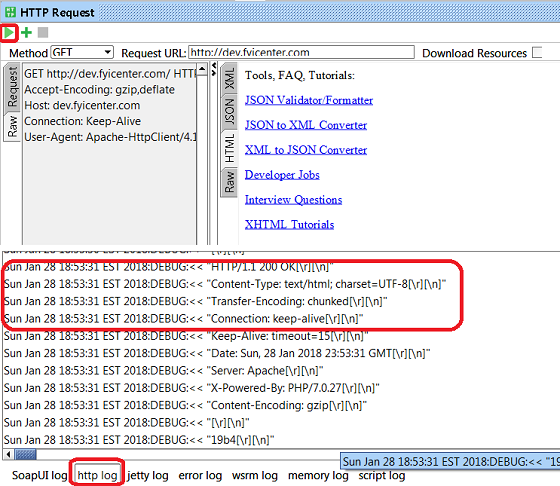
5. Click the "http log" tab at the button of the SoapUI window. You see HTTP request and response debug messages recorded by SoapUI.
...2018:DEBUG:>> "GET / HTTP/1.1[\r][\n]"
...2018:DEBUG:>> "Accept-Encoding: gzip,deflate[\r][\n]"
...2018:DEBUG:>> "Host: dev.fyicenter.com[\r][\n]"
...2018:DEBUG:>> "Connection: Keep-Alive[\r][\n]"
...2018:DEBUG:>> "User-Agent: Apache-HttpClient/4.1.1 (java 1.5)[\r][\n]"
...2018:DEBUG:>> "[\r][\n]"

...2018:DEBUG:<< "HTTP/1.1 200 OK[\r][\n]"
...2018:DEBUG:<< "Content-Type: text/html; charset=UTF-8[\r][\n]"
...2018:DEBUG:<< "Transfer-Encoding: chunked[\r][\n]"
...2018:DEBUG:<< "Connection: keep-alive[\r][\n]"
...2018:DEBUG:<< "Keep-Alive: timeout=15[\r][\n]"
...2018:DEBUG:<< "Date: Mon, 29 Jan 2018 00:36:14 GMT[\r][\n]"
...2018:DEBUG:<< "Server: Apache[\r][\n]"
...2018:DEBUG:<< "X-Powered-By: PHP/7.0.27[\r][\n]"
...2018:DEBUG:<< "Content-Encoding: gzip[\r][\n]"
...2018:DEBUG:<< "[\r][\n]"
...2018:DEBUG:<< "196f[\r][\n]"
...2018:DEBUG:<< "[0x1f][0x8b][0x8][0x0][0x0][0x0][0x0][0x0][0x0][0x3][0xed]]...
...2018:DEBUG:<< "R[0x83][0x8][0x83];[\n]"
...2018:DEBUG:<< "[0xf9]P[0xd7][0xc]Q[0xa4]AO[0x4][0xa8]b;vx[0xef][0xfd][0xaf]...
...
Use right-mouse click on log messages to copy or save debug messages.
The picture below shows you how to view HTTP log in SoapUI:
⇐ Add Assertion to Request in SoapUI
2018-04-12, ∼6491🔥, 0💬
Related Topics:
