Object Repository of Recorded Test
What is the Object Repository of Recorded Test?
✍: FYIcenter.com
 Object Repository of Recorded Test is a collection of Web objects
created during the recording session.
Object Repository of Recorded Test is a collection of Web objects
created during the recording session.
Each object has two primary properties:
- Type - Specifies if the object is a Browser window, a Web page, or a kind of page element.
- Name - Specifies the name of the object, so it can be referenced in the test script.
When the recording session is ended, you view recorded objects in these steps:
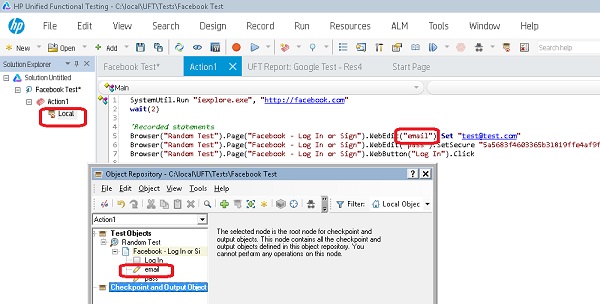
1. Click to open child list of "Action1" in the Solution Explorer pane. You see the "Local" Repository.
2. Double-click "Local" to open it. You see the "Object Repository" window.
3. Open each object in the object tree panel to review its properties.
4. For each object referenced in the test script, you should find the object definition in the object repository in the right location of the object tree.
For example, the following statement references the "email" page element object under the "Facebook - Login or Sign" page object of the "Random Test" browser object.
Browser("Random Test").Page("Facebook - Log In or Sign").WebEdit("email").Set "test@test.com"
The following picture shows you
the Object Repository of Recorded Test in UFT:
⇒ Build Object Repository with Object Spy
2018-05-19, ∼3334🔥, 0💬
Related Topics:

