Add Test to "Test Batch Runner"
Q
How to add test cases to "Test Batch Runner"?
✍: FYIcenter.com
A
 You can follow this tutorial to add test cases to "Test Batch Runner":
1. Start "Test Batch Runner".
2. Open an existing batch file or stay in the empty new batch file.
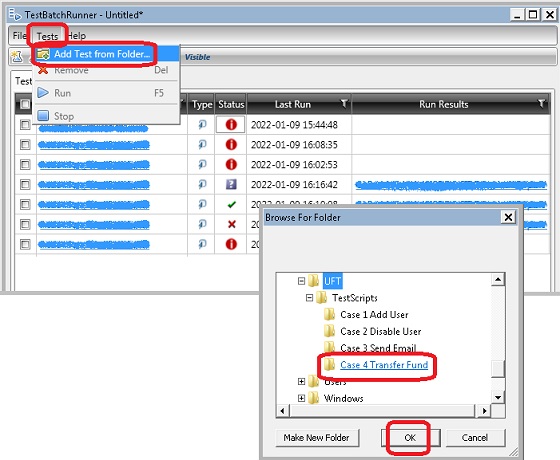
3. Click "Tests > Add Test from Folder" menu. You see the "Browse for Folder" dialog box.
4. Browse and select the folder where your test case is stored.
5. Click "OK". You see the select test case added to bottom of the test list.
The following picture shows you how to add tests to "Test Batch Runner":
2018-03-04, ∼4806🔥, 0💬
Related Topics:


