Open Result in "Run Results Viewer"
Q
How to open result in "Run Results Viewer"?
✍: FYIcenter.com
A
 You have "Run Results Viewer" started,
you can follow this tutorial to open any result
generated from any previously execution of any UFT tests.
You have "Run Results Viewer" started,
you can follow this tutorial to open any result
generated from any previously execution of any UFT tests.
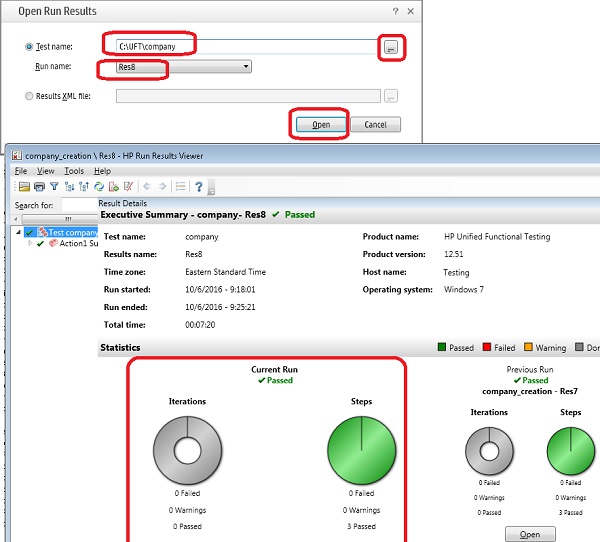
1. Click "File > Open" menu. You see the "Open Run Results" screen.
2. Select and set "Test name" to the folder where the UFT test is located. For example: C:\UFT\company.
3. Select and set "Run name" to the result name created by the test execution. For example: Res8.
4. Click "Open". You the test result detail screen. It shows that all 3 test steps were passed successfully.
The following picture shows you how to open test run result
in "Run Results Viewer":
2018-06-01, ∼5200🔥, 0💬
Related Topics:


