Start "Test Batch Runner"
How to start "Test Batch Runner" on my Windows computer?
✍: FYIcenter.com
 There are a couple of ways to start "Test Batch Runner" on your Windows computer:
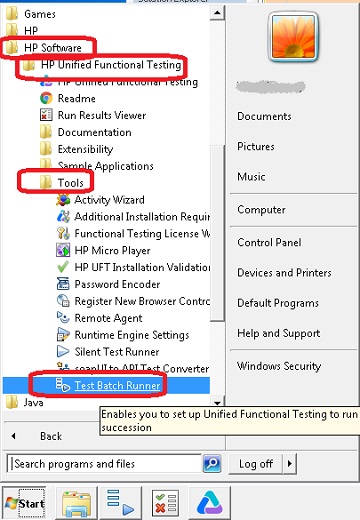
1. Go to the "Start" button, and select "All Programs > HP Software > HP Unified Functional Testing > Tools > Test Batch Runner". You see "Test Batch Runner" screen shows up.
2. Go to Windows search box and enter "Test Batch Runner". You see "Test Batch Runner" screen shows up.
3. In command line window and type in this command: "C:\Program Files (x86)\HP\Unified Functional Testing\bin\UFTBatchRunner.exe". You see "Test Batch Runner" screen shows up.
The following picture shows you how to start "Test Batch Runner"
from Windows "Start" button:
2018-03-04, ∼4165🔥, 0💬
Related Topics:


