Run SOAP Test Case in SoapUI
How to Run SOAP Test Case in SoapUI?
✍: FYIcenter.com
 You can follow this tutorial to run test cases in a SOAP project in SoapUI.
1. Open NDFD-soapui.xml project in SoapUI.
2. Double-click on "SOAP Request" you added as a test step in the test case. You see a sample SOAP request message.
3. Review the request message and change the "zipCodeList" value to be "12345".
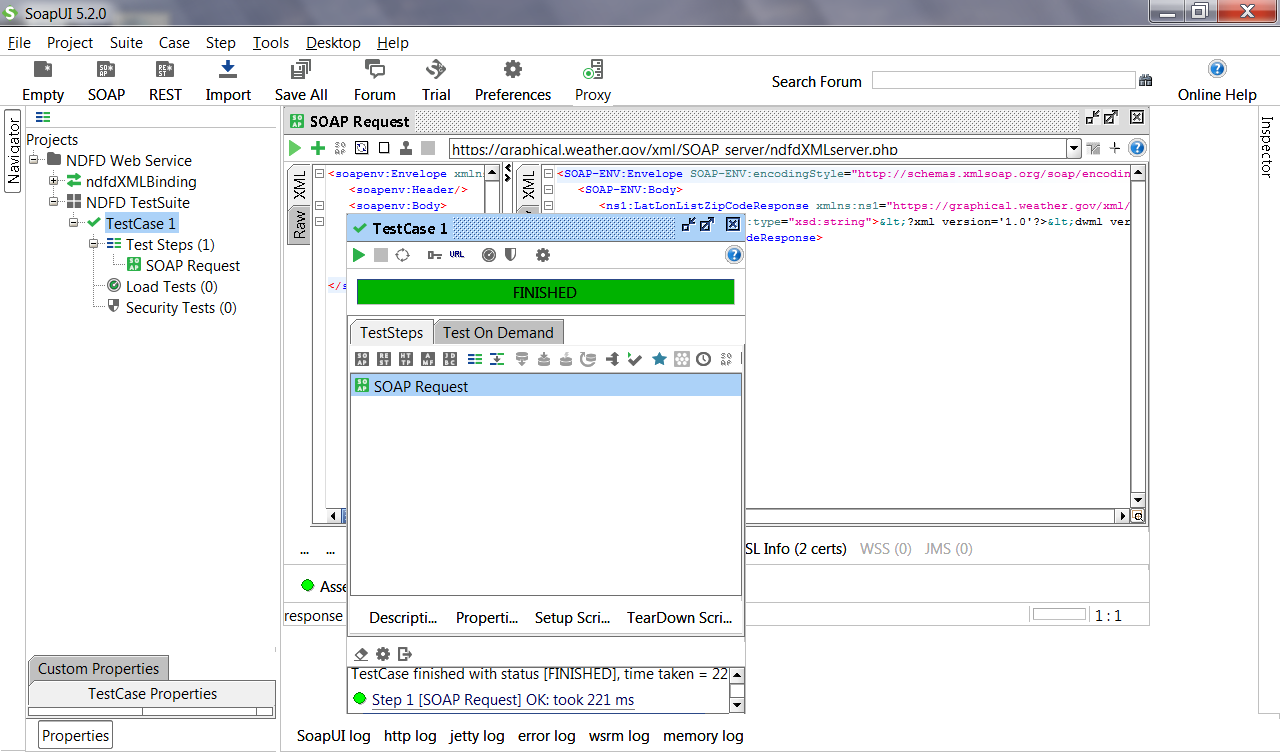
4. Double-click on "TestCase 1". You see "TestCase 1" window with 1 test step listed.
5. Click "Run" icon to run the test case.
6. Wait for the execution to finish. You see the execution status changed to "FINISHED" in green, because all test steps are executed and passed all assertions.
The picture below shows you how to Run SOAP Test Case in SoapUI:
⇒ Add "Not SOAP Fault" Assertion to SOAP Request
⇐ Add SOAP Request as Test Step in SoapUI
2018-04-07, ∼3213🔥, 0💬
Related Topics:
