Download and Install SoapUI
How to Download and Install SoapUI on my Windows computer?
✍: FYIcenter.com
 If you want to try SoapUI, you follow this tutorial
to download and install SoapUI on your Windows computer.
If you want to try SoapUI, you follow this tutorial
to download and install SoapUI on your Windows computer.
1. Go to SoapUI Website.
2. Click "Get It" under the "SoapUI OpenSource" heading.
3. Save the download file to your computer like: \fyicenter\SoapUI-x32-5.3.0.exe (117,038,632 bytes).
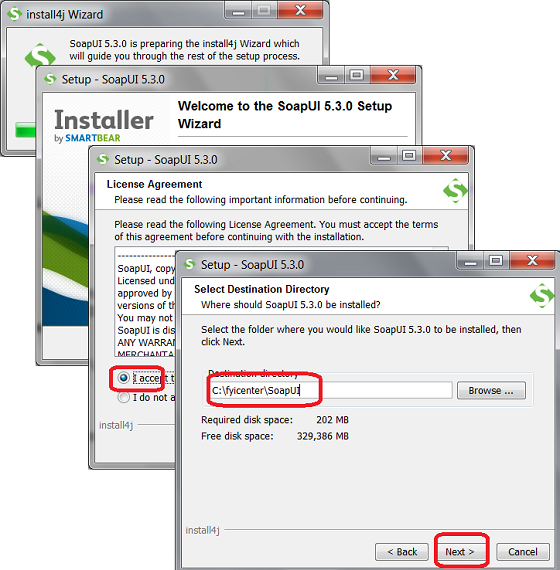
4. Double-click on the downloaded file \fyicenter\SoapUI-x32-5.3.0.exe to launch the setup program.
5. Click "Next" on the setup screen to continue.
6. Accept the agreement. And click "Next" to continue.
7. Enter "C:\fyicenter\SoapUI" in "Destination directory". And click "Next" to continue.
8. Take the default setting to install "HermesJMS" and "Tutorials". And click "Next" to continue.
9. Accept the agreement with HermesJMS. And click "Next" to continue.
10. Enter "C:\fyicenter\SoapUI-Tutorials" in "Tutorial location". And click "Next" to continue.
11. Take the default setting to create Start Menu Folder. And click "Next" to continue.
12. Take the default setting to create a desktop icon. And click "Next" to continue.
13. Wait for the installation to finish. And click "Finish" to end the installation.
13. Wait for the installation to finish. And click "Finish" to end the installation.
The picture shows you how to install SoapUI on Windows:
2018-02-03, ∼3559🔥, 0💬
Related Topics:

